


Sona - Music Player
4.7176.00 Reviews
App Specs
- Version
- 1.3.4
- Updated On
- License
- Free
- Downloads
- 500,000+
- Developer
- Merlis
- Categories
- Music & Audio
- Platform
- Android
Screenshots
 Analysis by AppCompare
Sona - Music Player is a free music and audio app from Merlis that takes a very direct approach: it is built around the idea of playing music when you want it, wherever you are. After spending time with it, I found that its main appeal is not an oversized collection of extras, but the way it keeps attention on listening. That makes it interesting for people who want a straightforward player rather than another service competing for their attention.
I would describe it as a practical choice for everyday playback on an Android device. It is suitable for Everyone, works from Android 8.0 onward, and the current version is 1.3.4. The app is free, which lowers the barrier to trying it, although “free” does not automatically mean it will suit every listener. The important question is whether you want a focused player or a broader music platform with discovery, subscriptions, and a large online catalog.
Why the focused playback experience matters
The capability I noticed most is the app’s emphasis on getting music playing without turning the experience into a constant search for something new. That sounds simple, but it changes how the application feels during ordinary routines. When I am getting ready, walking, studying, or doing housework, I usually want fewer decisions. I want to select something familiar and let the listening continue.
Many modern music alternatives are designed around discovery. They place recommendations, playlists, artist pages, editorial selections, and account features at the center. Those tools can be valuable, especially when I am bored with my own collection. They can also make a basic task feel unnecessarily busy. Sona - Music Player is more appealing when my priority is control over the music I already want to hear.
The real strength is reduced friction: the app gives the listening task more importance than the surrounding service. I do not see that as a replacement for every music app. Instead, I see it as a useful second option for people who want a calmer way to handle playback on a phone or tablet.
That distinction is important before installing it. If you expect an extensive streaming catalog, social listening, radio stations, or personalized discovery, this is probably not the direction you are looking for. If you value a player that stays close to the basic purpose of music software, the approach makes much more sense.
What the app changes in an everyday routine
Imagine a weekday morning when I have only a few minutes before leaving home. With a discovery-focused service, I may begin by checking recommendations, dismissing tracks I do not want, and deciding whether to start an album or a playlist. With a focused player, I can make that choice once and move on. The benefit is not dramatic, but it is repeated every day: less screen time spent managing the app and more time actually listening.
Worth Reading Before You Choose

Flipboard Shows What News Apps Must Do Beyond the Feed

Switching to Android Auto Means Rethinking Your Driving Routine

Google Calendar Makes a Crowded Week Easier to Manage

Ludo King Makes the Most of the Minutes Between Plans

Baby Panda World Brings Quick Play to Modern Phones, but Its Game Library Feels Busy

ESPN’s Live Game View Makes Following Close Games Easier
The same applies to concentration. When I am reading or working through a repetitive task, I do not necessarily want the application to suggest something every few minutes. A player that stays in the background can be more comfortable than one that constantly encourages browsing. Sona is best understood through that use case: it supports listening as part of another activity instead of demanding to become the activity.
There is also a useful difference between convenience and variety. A large streaming platform generally wins when I want to explore unfamiliar artists or follow new releases. Sona is more attractive when I already know what I want and do not need a service to make the decision for me. Neither approach is universally better; they solve different problems.
How I would use it in practice
I would begin by treating Sona as a dedicated listening tool rather than a complete music ecosystem. My first test would be simple: choose music for a specific part of the day, start it, and see whether the player stays out of the way. This is a better test than opening it with the expectation that it will replace every music-related app on the device.
For a commute, I would prepare the music I already know I want before leaving. That small habit matters because it avoids making playback decisions while walking, driving, or dealing with a weak connection. Even when an app is easy to use, the safest workflow is to make choices while stationary and keep interaction to a minimum once the journey starts.
For study sessions, I would use a consistent album or familiar selection instead of changing tracks repeatedly. The point is to preserve the app’s low-distraction character. If I keep opening the player to adjust every song, I lose the main benefit. Sona works better when I decide on a listening mood in advance and allow the session to continue.
A less obvious use is separating listening habits. I can imagine using a broad streaming service for discovery and Sona for dependable playback of music I return to often. That division prevents recommendations from taking over the moments when I simply want familiar audio. It also gives the focused player a clear job instead of forcing it to compete with a larger platform on every feature.
Another practical tip is to judge the app by how quickly it gets out of your way. Do not evaluate it only by the first screen or by the number of visible controls. Pay attention to the whole sequence: opening the app, choosing music, starting playback, and returning to your main task. The value is in that repeated sequence being uncomplicated.
Where the experience is strongest
Sona feels most suitable for listeners who already have a clear idea of what they want to hear. That includes people who replay albums, keep a personal collection, or prefer choosing music themselves instead of accepting an algorithm’s next suggestion. It can also suit households where the phone is used as a simple music source and the listener does not want a complicated account-centered experience.
The free price is another practical advantage. It means a curious listener can try the app without committing to a paid plan. I would still approach the decision realistically: the absence of a price does not guarantee that the app will provide the catalog or discovery tools found in subscription services. The benefit is affordability and simplicity, not necessarily breadth.
The Everyone age rating makes the app approachable for a wide audience. Parents, older relatives, and less technical users may appreciate a music player that does not require learning a large collection of service-specific features. That said, ease of use depends on the listener’s expectations. Someone accustomed to a fully integrated streaming account may initially find a focused player less expansive, even if it is easier to understand.
Merlis has positioned the app in the Music & Audio category, where it faces very different kinds of competition. Some alternatives are streaming platforms, some are podcast tools, and others are advanced local players aimed at enthusiasts. Sona’s identity is clearer when compared with the first group: it is not trying to win by offering the biggest entertainment universe. Its appeal comes from keeping playback central.
The tradeoffs I would consider before switching
The main limitation is the same quality that makes the app appealing. A focused player can feel narrow if I want discovery, recommendations, new releases, artist information, or a large online library in one place. I would not install Sona expecting it to replace a service built around those activities. It is better viewed as an alternative for playback, not as an all-purpose music destination.
There is also a tradeoff between personal control and convenience. Choosing my own music can be satisfying, but it requires me to maintain some sense of what I want to hear. A streaming service can rescue me when I have no idea what to play. Sona is less useful on those indecisive days, when I want the app to supply the mood rather than simply play my selection.
Listeners who enjoy constantly changing mixes may find the focused approach restrictive. The same is true for people who want music and spoken audio managed inside one large application. In those cases, a broader platform is probably the better fit. I would also skip Sona if my main reason for installing a player is social sharing or collaborative listening, because those expectations belong to a different type of product.
Another point is that a simple interface does not remove the need for good listening habits. I would avoid repeatedly checking the screen while moving around, and I would prepare choices before driving. The app may make playback less distracting, but no player can make unsafe phone interaction acceptable. Its simplicity should support better habits, not encourage more frequent phone use.
Version 1.3.4 is the current release, and the Android requirement of 8.0 keeps the app accessible to many devices that are not running the newest system software. That is helpful for people who keep a dependable older phone as a music device. At the same time, older hardware can behave differently from newer phones, so I would test it during the exact routine where I plan to rely on it rather than assuming every device will feel identical.
Who gets the most from Sona
I think the best match is someone who says, “I already know what I want to listen to; I just want a clean way to play it.” That person benefits from the app’s focused purpose, free access, and broad age suitability. The value increases when music is part of a routine: a morning start, a commute, a workout, a study block, or background listening while doing chores.
It is also a sensible option for someone who feels overwhelmed by large music services. If recommendations and catalog browsing are more distracting than helpful, a simpler player can restore a sense of ownership over the listening session. The app does not need to be the only music tool on the device. In fact, I think it works best alongside a discovery service, with each application handling the job it does well.
I would be more cautious about recommending it to a listener who wants everything in one account. If you depend on a large catalog, algorithmic playlists, release alerts, social features, or extensive artist exploration, a conventional streaming alternative will likely offer more value. Choosing Sona in that situation could leave you switching between apps and wondering why the experience feels incomplete.
The app’s reception suggests that the focused idea resonates with many users: it has a 4.7 average from around 8.9 thousand ratings and has passed 500 thousand installs. Those figures do not tell me whether it will match every personal workflow, but they do show that the concept has attracted a substantial audience. I would read that as encouragement to try it, not as a reason to ignore the tradeoffs.
My final take after using it
Sona - Music Player is a good recommendation for a specific need: uncomplicated music playback without making discovery the center of the experience. I like that its identity is easy to understand. It is free, available for Everyone, developed by Merlis, and compatible with Android 8.0 or later. More importantly, it makes sense when I want music to support my day rather than interrupt it.
I would recommend installing it if you value familiar listening, want a less demanding alternative to a streaming platform, or need a separate player for routine playback. I would not recommend it as the only music app for someone whose enjoyment depends on exploring a huge catalog or receiving constant personalized suggestions.
My practical advice is to test it during one complete routine instead of judging it after a quick glance. Use it for a commute, a study session, or household work. Decide your music first, start playback, and notice whether the app helps you spend less time managing the screen. If that is the result you want, Sona earns its place. If you need a music service to discover and organize everything for you, a broader alternative will remain the stronger choice.
Pros
- Clean
- distraction-free interface for browsing albums
- artists
- and playlists.
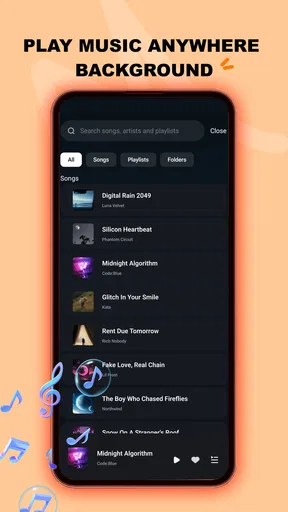
- Supports background playback while using other apps or locking the screen.
- Quick search makes finding locally stored songs simple and convenient.
- Playback controls are easy to reach from notifications and the lock screen.
- Useful for listeners who prefer owning and managing offline music files.
Cons
- Features may depend on the audio formats and tags in your local music library.
- No built-in access to major music streaming catalogs or online radio stations.
- Large libraries can require time to scan and organize after installation.
- Some advanced playback options may feel limited for power users.
- Battery use can increase during extended playback with visual effects enabled.
FAQs for Sona - Music Player
What is Sona - Music Player, and what can it do?
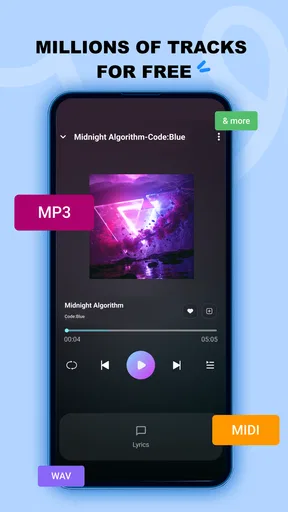
Sona - Music Player is designed for listening to music stored on your device, offering a focused alternative to streaming platforms. Depending on the version and device, it may provide features such as playlists, album and artist browsing, search, queue management, repeat and shuffle controls, background playback, and customizable playback settings. It is best suited to users who already keep local audio files on their phone.
Does Sona - Music Player require an internet connection or account?
For playing music that is already downloaded to your device, Sona generally does not need a constant internet connection. This makes it useful for offline listening, travel, or areas with limited coverage. An account may not be necessary for the core player, although certain optional features, updates, integrations, or music-import methods could depend on the specific release and platform permissions.
Which audio files and devices are supported by Sona - Music Player?
Compatibility can vary according to whether you use the Android or iOS edition and which version is installed. The app is primarily intended for common local music formats, but unusual codecs, protected files, or tracks managed by another service may not appear or play correctly. Before downloading, check the store listing and confirm that your phone’s operating-system version is supported.
Can I organize my music and create playlists in Sona?
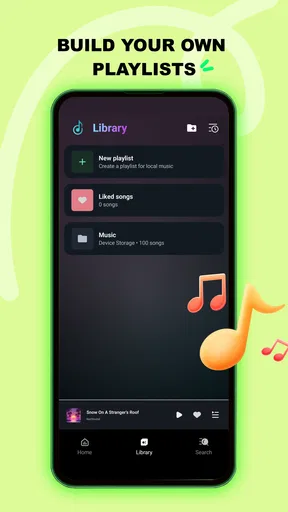
Sona is intended to make a personal music library easier to browse and control. Users can typically view tracks by categories such as songs, albums, or artists, then build a listening queue or create playlists for different moods and activities. The exact organization tools may differ between releases, so users with large libraries should test scanning, sorting, and playlist management after installation.
Is Sona - Music Player free, and are there advertisements or in-app purchases?
The availability of free features, advertising, and optional purchases depends on the current store version and the platform where Sona is downloaded. Some releases may provide the basic player at no cost while reserving advanced customization or convenience features for a premium option. Review the official listing before installing, and check the permissions and subscription details carefully if an upgrade is offered.


